
Start with the business question.
Use the language your team already uses. Ask about buying patterns, a customer’s invoices, product availability, or a draft order.
AI & voice · native to the operational core
AI is more useful when it understands the work behind the question. Abbey connects the conversation to your customers, products, orders, inventory, and financial context.
Live voice, chat & dynamic interfaces
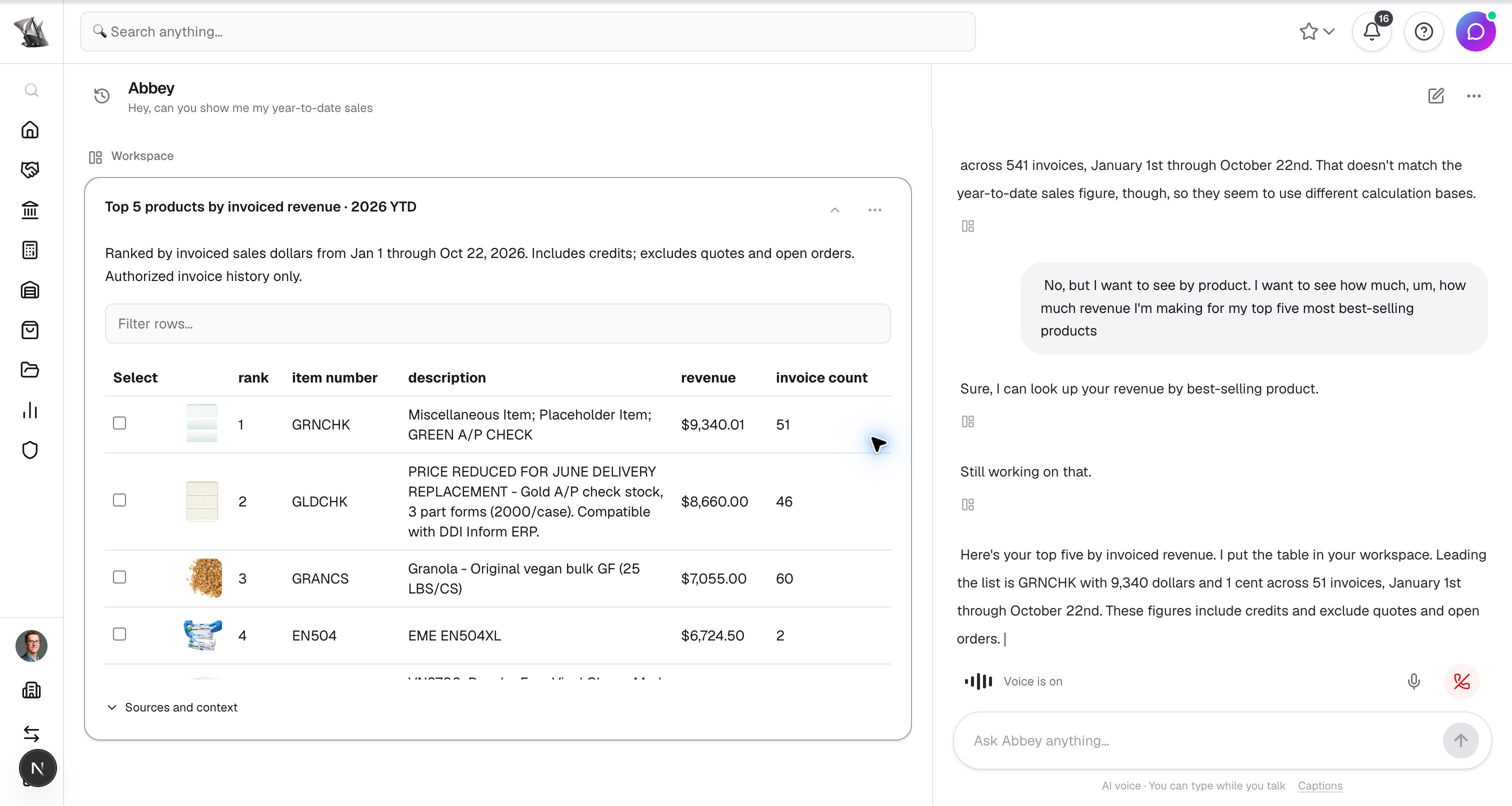
Ask Abbey about your business in your own words. Which products sell best? What is a customer buying less of? Which orders need attention? Speak live or type in chat, then follow up as the conversation develops.
Abbey brings the answer into the workspace as tables, charts, metrics, records, and editable drafts. In this conversation, a question about best-selling products becomes a ranked revenue table with product images and invoice counts, right beside the live chat.
Through MCP (Model Context Protocol), compatible assistants can also connect to Abbey’s business tools and data. Whether you ask in Abbey or through a connected assistant, answers draw on the records and tools your permissions allow.
AI order processing
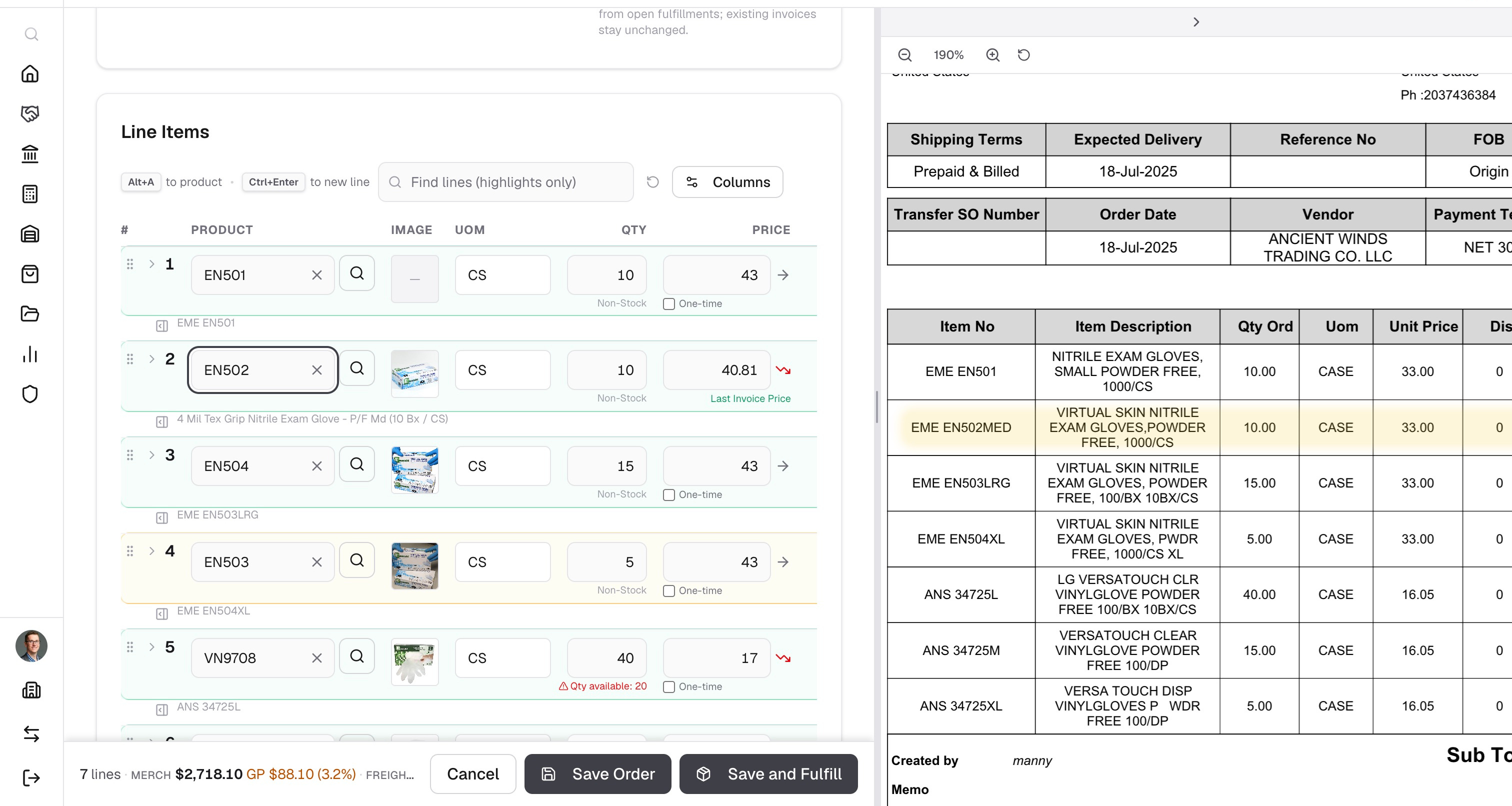
Abbey reads the incoming request, matches the customer and products, and prepares the order. Your team can focus on the requests that need judgment.
What AI-native means in practice
Use the language your team already uses. Ask about buying patterns, a customer’s invoices, product availability, or a draft order.
Work with charts, metrics, records, tables, and editable drafts. Follow a source or ask another question without starting the investigation again.
Check the prepared fields and give the go-ahead before creating an order or sending an email. Your permissions and business rules still apply.
Beyond a single assistant
From capturing demand to investigating a service issue, Abbey puts intelligence into the places where people spend their day.
Start with a question and follow it into the next task. Speak naturally or type, explore visual answers, and keep the same conversation as you move through Abbey.
Bring in a customer PO, a product list, or a vendor bill. AI helps extract the details so your team can focus on matching, exceptions, and review.
Ask for a report in everyday language, inspect its query and result, and refine it in conversation. Save a useful report for the next time you need it.
Case AI can classify a request, investigate approved customer records, and prepare a cited reply. Topics and policies control what the investigation can use.
Describe a custom app or widget, refine it with Abbey, and preview the result. Build around business capabilities instead of exporting work into another spreadsheet.
Abbey’s MCP connection lets compatible, approved assistants work with authorized records and business tools. Customer lookup, pricing, inventory, and order preparation share the same ERP context.
Capabilities depend on tenant licensing, configuration, connected services, and the user’s permissions. Generated results and drafts should be reviewed.
The AI Trust Layer
Model access, policy, and audit history are managed through Abbey’s centralized AI Trust Layer. Business capabilities retain their own authorization and validation.
Tools operate within the tenant and the permissions of the user. A conversation does not grant additional access to restricted records or financial data.
Inspect the records, calculations, source documents, or citations behind an answer. Keep the business context available while reviewing the result.
Review and confirm interactive business writes. Case automation follows configured topic policies, approved tools, and a human fallback.
A few practical questions
Yes. Type in the same assistant workspace and work with the same cards and drafts. Live microphone conversations require the Workspace Voice Mode license and microphone access.
No. Abbey prepares a draft for review. You confirm the displayed draft before the business record is created; unresolved required fields and business validation still apply.
Case AI can use the records and approved knowledge allowed by the case topic. Investigations stay scoped to permitted customer evidence, and reply suggestions include checked citations. Administrators choose review and automation policies.
Compatible assistants can connect through Abbey’s authenticated MCP interface. Available tools and data follow the user’s permissions and organization security settings.
Let’s talk about your operation
Bring an example from your operation. We’ll walk through order entry, purchasing, fulfillment, and billing with your team.